Posts

Showing posts with the label Blog

How to take Coordinates from Google Earth & use them in to Auto CAD

Image
Answer : Google earth latitude and longitude convert to coordinates Here you can learn how to take coordinates from Google earth directly you cannot take coordinates from Google Earth when you click for coordinates in google earth it will create you only latitude & longitudinal values then you have to convert them in to coordinates in this tutorial i explain easiest way so watch till end. Calculate latitude and longitude using the formula:  latitude = asin (z/R) and longitude = atan2 (y,x) . In this formula, we have the values of x, y, z and R from step 2. Asin is arc sin, which is a mathematical function, and atan2 is a variation of the arc tangent function. The symbol * stands for multiplication See the in below turorial Subscribe our youtube channel & follow on social media to get more easy methods & tricks Comment us if you have any questions

AutoCAD Manu bar missing?

Image
  3 Methods can solve manu bar missing Manu bar missing problem can solve by 2 to 3 methods first a fall option (OP) enter  Click on profile Click on Reset you AutoCAD will reset all default settings if its not works type (RIBBON) enter it will all comes your missing bars but if its still not works Type in windows search (Reset settings to default) Click ok Reset custom settings then click ok your AutoCAD will start again it will comes with original settings I hope you get the procedure easily  Follow us to get easy tricks & methods Comment us if you you have any questions  

How to add custom scale in AutoCAD?

Image
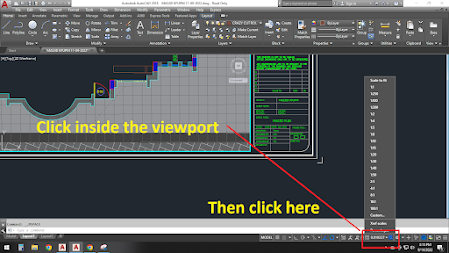
Welcome to AutoCAD training  We will show you very easy & simple method first a fall go to your layout click in the (MV VIEWPORT) Follow the below provided picture Then click on (Custom) you can see above the red rectangle then click on (Add) follow below picture Then add your scale like if you need 1:400 scale paper units1 drawing unit 400 I hope you get the procedure Follow us for more tricks & methods Comment us if you have any questions

How to convert pdf to dwg.?

Image
  Answer: Yes you can convert pdf to dwg. Here you can convert pdf to dwg its very simple and if you have any pdf which created in dwg to pdf that file easily can convert see the method below Click on (INSERT) then (PDF IMPORT) then upload your file  Then select this options which highlight in above picture then click ok your file will be converted in AutoCAD Follow us for more tricks & methods  comment us if you have any questions

How to print 100 JPG �� images in 1 order

Image
1) How to print hundreds of Jpg images? Answer: yes you can print 100s of jpg images Here in this tutorial you can learn how to print 100s of jpg images just select them all then ctrl-p it will take you to print settings to change the paper size that's it easy. have any droughts you can comment me below.